
HUANUO Brushless Motor Frame
4.7Editor score
Brushless single-motor lift
220-pound load capacity
Four programmable height presets
Wide desktop fit range
Explore the best standing desk frame with legs only, comparing capacity, motor design, height range, desktop compatibility, controls, and cable management.
A standing desk frame with legs only gives you the freedom to build a workstation around your own desktop, preferred materials, and room layout. A good frame should feel stable, move smoothly, fit the intended top, and offer enough height control to support frequent transitions between seated and standing work.
We compared all ten frames using the information supplied by each manufacturer, focusing on lifting capacity, motor configuration, adjustment range, desktop compatibility, preset controls, cable management, stability features, and installation support. The list includes single- and dual-motor frames, two-leg and four-leg designs, and options for different desktop sizes.
Each review explains the frame's strongest attributes, notable limitations, and ideal buyer. The top three picks represent a balanced recommendation, a value-oriented choice, and a premium option, while the remaining reviews provide more specialized choices. Product availability and pricing can change, so confirm current details before purchasing.
4.7Editor score

4.9Editor score

4.7Editor score
This side-by-side comparison covers the essential design differences among all ten frames, including lift system, load capacity, adjustment range, desktop compatibility, and control features.


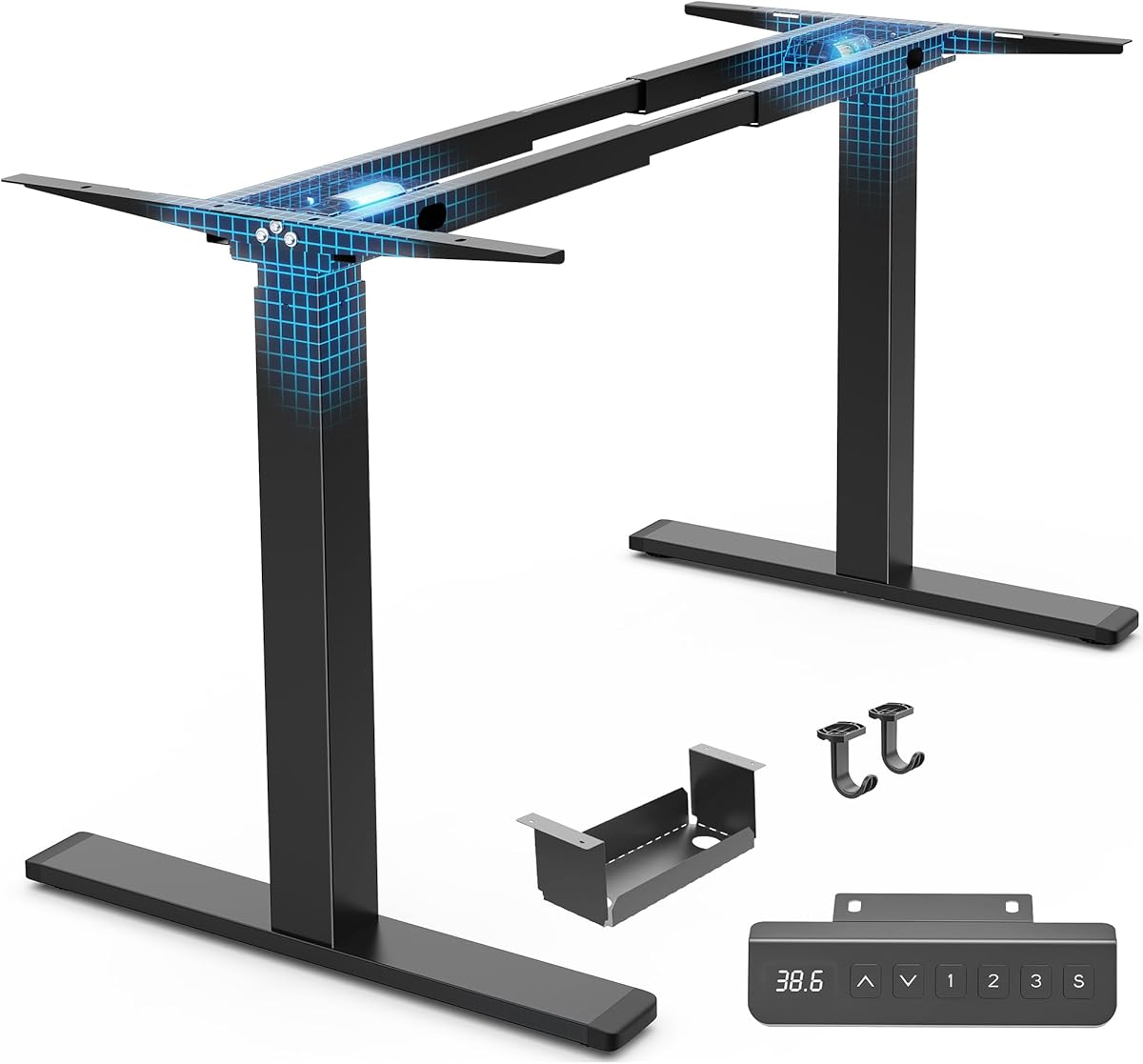


The HUANUO Standing Desk Frame with Brushless Motor combines a 4.7 rating with a capable 220-pound lifting capacity, making it an appealing all-around frame for a custom workstation. Its brushless motor is specified for faster, quieter movement, with a maximum noise level of 55 decibels and testing for 100,000 lift cycles.
We may earn a commission when you buy through this link, at no additional cost to you.
The frame's steel construction is reinforced with longer plates, thicker columns, and wider feet. Its extendable crossbars span 41.7 to 60.6 inches, allowing compatibility with desktops from 43.3 to 74.8 inches wide and 23.6 to 35.4 inches deep. Four programmable preset buttons make common sit-stand transitions quick and repeatable.
The principal trade-off is its single-motor arrangement. Buyers who expect to place unusually heavy equipment on the desktop, want a particularly wide top, or prefer the lifting characteristics associated with two synchronized motors may find a dual-motor option more appropriate. The desktop is also not included, so the final size and appearance remain entirely up to the buyer.
This is a strong recommendation for a home office or studio where a reliable brushless motor, generous preset controls, and broad size compatibility matter more than having the highest possible load rating. Measure the desktop and confirm frame dimensions before ordering, then install the included cable tray and clips for a finished setup.
The electric lift travels from 27.9 to 46.5 inches, providing a useful seated-to-standing range. Four presets reduce the need to hold or adjust controls repeatedly, making this practical for a workstation used throughout the workday.
A cable management tray, six cable clips, and two hooks help keep a power strip, cords, headphones, and bags organized beneath the desktop. These additions make the frame more practical for a finished office setup.
We may earn a commission when you buy through this link, at no additional cost to you.
The ErGear Dual Motor Standing Desk Legs hold a 4.7 rating and offer a substantial 264-pound capacity, placing them among the strongest frames in this guide. The dual-motor mechanism moves at 1 inch per second and is rated for testing through 80,000 lift cycles, combining useful speed with a heavy-duty foundation.
We may earn a commission when you buy through this link, at no additional cost to you.
Retractable crossbars accommodate desktops from 44 to 90 inches long and 24 to 31.5 inches wide. The frame adjusts from 28 to 47 inches, while four customizable memory presets make it easy to switch between preferred working positions. An extra extension cord adds flexibility when positioning the controller.
Its size and weight are meaningful trade-offs. A frame designed to support desktops up to 90 inches will require adequate room and careful handling during assembly. The stated capacity is also a maximum under appropriate use rather than a reason to ignore the desk material, screw requirements, or manufacturer guidance.
This frame is best suited to buyers building a large dual-monitor workstation, creative desk, or shared office setup that may carry multiple monitors and other equipment. For those needs, the high capacity and wide adjustment range are more meaningful than minimizing the size of the frame.
A 264-pound maximum load gives the frame room for substantial displays, computer equipment, and accessories. Thickened, widened steel legs are designed to resist wobbling during use and movement between heights.
Retractable crossbars allow the frame to adapt to desktop lengths from 44 to 90 inches. This makes the frame a practical foundation for a broad, room-filling workstation rather than a compact computer desk.
We may earn a commission when you buy through this link, at no additional cost to you.
The ErGear Electric Standing Desk Legs for 39.4-63.3 inch desktops offer a 4.7 rating, a 176-pound capacity, and a straightforward electric adjustment system. They are well suited to compact home-office desktops that need regular height changes without requiring an oversized frame.
We may earn a commission when you buy through this link, at no additional cost to you.
The crossbars extend from 35.4 to 53.1 inches and have a fixed width of 16.2 inches. Compatible tops measure 39.4 to 63.3 inches long and 24 to 30 inches deep. Height adjustment covers 28.3 to 46.5 inches, while an intuitive panel provides four memory presets.
Compared with the heavier dual-motor models, this frame has a lower load ceiling and a single-motor layout. That makes it less appropriate for dense editing consoles, multiple large monitors, or other unusually heavy desktop arrangements. Its narrower desktop range also limits flexibility for buyers who want a very broad work surface.
For a typical office computer, monitor, keyboard, and everyday accessories, the stated capacity is ample. It is a sensible choice for smaller rooms and users who prioritize quiet operation, familiar controls, and simple sizing over maximum capacity. Verify the top's dimensions before assembly.
The motor operates at a stated 55 decibels, making it suitable for shared rooms or video calls where a noisy adjustment would be disruptive. Four saved positions streamline repeated changes.
Anti-collision technology is intended to help avoid damage to the desk or nearby furniture while the frame is moving. It adds a practical safeguard for busy workspaces.
We may earn a commission when you buy through this link, at no additional cost to you.
The VIVO Electric Dual Motor Standing Desk Frame has a 4.7 rating and supports up to 220 pounds when connected to power. Its two-part telescopic columns and hidden-drive dual motors make it a practical choice for a custom workstation with substantial everyday equipment.
We may earn a commission when you buy through this link, at no additional cost to you.
The recommended desktop dimensions span 40 to 77 inches long and 23 to 43 inches wide, with a thickness of at least 0.75 inch. The actual frame extends from 40 to 57.3 inches and adjusts vertically from 28.5 to 47.3 inches. Lift speed is 1 inch per second.
Its three memory settings are fewer than several competing models, but they cover the primary sitting and standing positions most users need. Buyers must also ensure that the desktop meets the thickness requirement and that the broader top dimensions do not exceed the intended frame adjustment.
This VIVO frame suits a wide range of DIY projects, from a large creative desk to a dual-monitor office setup. Its combination of dual motors, adaptable top width, leveling feet, and a 220-pound capacity offers a balanced option for buyers who value flexibility and straightforward operation.
The recommended top size spans a notably broad range, including widths up to 43 inches. That flexibility helps buyers design around their preferred desktop rather than choosing a fixed complete desk.
Adjustable leveling feet allow the frame to accommodate uneven floor surfaces. This feature can improve stability and reduce rocking in rooms where perfect floor level is difficult to guarantee.
We may earn a commission when you buy through this link, at no additional cost to you.
This ErGear Electric Standing Desk Legs model carries a 4.7 rating and shares a compact, approachable design for standard office desktops. It raises the practical question of how much capacity and top size are truly necessary for a personal sit-stand workspace.
We may earn a commission when you buy through this link, at no additional cost to you.
The frame supports up to 176 pounds and fits desktops from 39.4 to 63.3 inches long and 24 to 30 inches deep. Its height range is 28.3 to 46.5 inches. Four memory presets, quiet operation at 55 decibels, and anti-collision technology make daily use straightforward.
Its limits are clear: a single-motor design, a 176-pound ceiling, and a narrower crossbar than the larger dual-motor ErGear option. If the desktop will hold several large displays, specialist equipment, or numerous accessories, choosing the higher-capacity model could provide more margin.
This is a good selection for a compact home office, study area, or single-person workstation where moderate equipment loads and a conventional desktop size are expected. It prioritizes the core benefits of electric height adjustment without adding the bulk of a wide, heavy-duty frame.
The relatively compact compatibility range makes this model easier to pair with common office desktops. It suits users building a straightforward computer station rather than an expansive multi-device bench.
Four memory positions allow common heights to be recalled quickly. This is particularly convenient for users who alternate between seated and standing work throughout the day.
We may earn a commission when you buy through this link, at no additional cost to you.
The Huuger Dual Motor Electric Standing Desk Frame offers a 4.4 rating and emphasizes quiet movement, a wide desktop range, and an informative LED keypad. It is designed for DIY desks that need enough width for a large monitor arrangement or broad work surface.
We may earn a commission when you buy through this link, at no additional cost to you.
The dual-motor system operates below 45 decibels and adjusts from 28.4 to 46.5 inches. Compatible desktops range from 47.2 to 86.6 inches long and 23.6 to 39.4 inches wide. Laser-engraved crossbeam markings help users align leg width more precisely during installation.
Unlike several alternatives, the supplied product information does not state a maximum load capacity. That omission should prompt buyers to consult the current product listing and documentation before committing, especially for equipment-heavy desks. The three presets are also fewer than the four offered by several competitors.
This frame is most appropriate for users who prioritize a quiet dual-motor system, a long and potentially wide desktop, and visible controls. Confirm capacity, top thickness, and mounting requirements with the seller before buying. With those checks completed, it could be a strong fit for a spacious home office.
Operation below 45 decibels is the standout feature, making the frame suitable for offices where calls, recordings, or focused work make motor noise undesirable. The dual-motor architecture also supports smooth movement.
Laser-engraved markings on the crossbeam provide visual references when setting leg width. This reduces guesswork during assembly and can help produce a more symmetrical finished frame.
We may earn a commission when you buy through this link, at no additional cost to you.
The HUANUO Dual Motor Electric Standing Desk Frame has a 4.6 rating and a stated 265-pound capacity, the highest load figure in this comparison. Its dual-beam design and wider side wings target stability with large desktops, making it a serious option for equipment-heavy workstations.
We may earn a commission when you buy through this link, at no additional cost to you.
The two motors move the frame from its lowest to highest position in 20 seconds and provide a height range of 28.3 to 47.2 inches. Extendable beams span 42.1 to 69.2 inches, allowing pairing with desktops up to 90 by 31.5 inches. Cold-rolled automotive-grade steel supports the stated structural design.
The frame is listed as stable after 50,000 full-load tests, while some competing products cite 80,000 or 100,000 cycles. Test figures are not directly comparable without more detail, so buyers should treat them as one durability signal rather than the sole basis for a decision. Only three preset heights are programmable.
Choose this model when the desktop will be large, heavy, or fitted with multiple displays and specialized equipment. The 51.2-inch extension cord also makes controller placement more flexible than setups with short leads. Buyers should still verify their desktop dimensions and mounting requirements.
The 265-pound capacity and dual-beam construction offer useful support for broad desktops carrying multiple displays and heavy accessories. The stated minimum load of 265 pounds should be checked against the manufacturer's wording before purchase.
A 51.2-inch power cord allows the controller to be mounted away from the center of a large top. This can improve access and make the finished desk more convenient to operate.
We may earn a commission when you buy through this link, at no additional cost to you.
The Marsail Dual Motor Standing Desk Frame leads this group with a 4.9 rating, the highest customer rating among the ten products. It combines a 264-pound capacity, dual-motor lifting, four presets, and a broad desktop range in a package that feels well matched to serious home-office builders.
We may earn a commission when you buy through this link, at no additional cost to you.
The thicker, wider steel frame adjusts from 28 to 47 inches and lifts at 1 inch per second. Retractable crossbars support desktop lengths from 44 to 90 inches and widths from 24 to 31.5 inches. Testing through 80,000 lift cycles provides reassurance about the longevity of the powered mechanism.
The main compromise is size. Buyers who want a small desk or have limited floor area may find the 44-inch minimum desktop length impractical. There is also no desktop included, and the frame should still be matched carefully to top thickness, weight, and mounting requirements.
For most people building a large, stable workstation, this is the strongest overall balance in the guide. It offers substantial capacity, smooth dual-motor movement, useful organization accessories, adjustable leveling feet, and a five-year warranty. It is our primary recommendation for expansive professional-style setups.
Dual motors lift up to 264 pounds at 1 inch per second, while the wider steel structure helps resist wobble. This combination is well suited to a desk with multiple displays and regular daily height changes.
An under-desk tray, cable clips, two side hooks, adjustable leveling feet, detailed instructions, and a five-year warranty make the frame feel thoughtfully designed for a complete custom workstation.
We may earn a commission when you buy through this link, at no additional cost to you.
The VIVO DESK-V103E stands out for its 23.5- to 49.3-inch height range, the broadest adjustment interval among the frames reviewed. With a 4.7 rating, 220-pound capacity, and fast 1.5-inch-per-second lift, it suits users who need more extreme height positioning.
We may earn a commission when you buy through this link, at no additional cost to you.
Recommended desktops measure 40 to 85 inches long and 23 to 43 inches wide, with thickness of at least 0.75 inch. The actual frame length extends from 39.3 to 65.3 inches. Its three-part telescopic columns and hidden-drive dual motors provide the structure and movement needed for a broad custom desk.
The minimum height is exceptionally low, but it does not mean every user will want the frame at that setting. Taller users may find the upper limit useful, while others will operate mainly within a conventional range. The desktop is not included and must meet the specified dimensions and thickness.
This VIVO model is ideal for ergonomic setups where fine positioning across a wide vertical span is important. It also works well for unusual desk designs requiring a low or high final position. Buyers prioritizing the largest possible adjustment range should give this frame particular consideration.
The 25.8-inch overall travel range lets users position the desktop much lower or higher than most competing frames. This flexibility can benefit shorter users, tall users, and specialized creative workstations.
A lift speed of 1.5 inches per second is among the fastest listed here. The dual-motor system helps produce smooth movement while reducing the wait for a full height change.
We may earn a commission when you buy through this link, at no additional cost to you.
The VIVO Premium 4-Leg Electric Dual Motor Standing Desk Frame has a 4.7 rating and offers a distinctive four-leg structure. That configuration provides additional support points under a broad top, making it appealing for buyers who prioritize stability over a minimal two-leg design.
We may earn a commission when you buy through this link, at no additional cost to you.
The frame supports desktops from 46 by 23 inches up to 84 by 43 inches, with an actual frame length of 45.3 to 64 inches. Its all-steel construction supports up to 220 pounds. Dual motors adjust the height from 28.8 to 47 inches at a stated speed of 0.8 inch per second.
Compared with the other choices, the four-leg layout is less space-efficient and may require more care around corners. Its listed lift speed is also slower than the 1- to 1.5-inch-per-second figures given for several two-leg frames. Three memory presets cover the essential positions.
This is the best pick for a large L-shaped or broad custom desk where additional leg support and enhanced stability are worth the additional footprint. It is also a sensible premium option for an office where the frame will remain in place and serve as a central workstation.
The four-leg design distributes support across a broader base than a conventional two-leg frame. This can be especially useful beneath wide desktops or where a particularly stable foundation is a priority.
Dual motors move the top from 28.8 to 47 inches with quiet electronic control. The lift is slower than some competitors, but the adjustment remains designed for regular seated and standing transitions.
We may earn a commission when you buy through this link, at no additional cost to you.
Choosing a legs-only standing desk frame means balancing capacity, size, stability, motor performance, and the desktop you already own or plan to buy. The most important step is to measure the work area and identify the equipment the finished desk must support.
Begin with the physical dimensions of the desktop rather than the maximum size advertised by the frame manufacturer. Check the recommended length, width, and thickness, then compare those figures with your own top. Also consider whether the frame's actual adjustment range can securely support the desktop at both its shortest and widest settings.
Choose a frame with comfortable clearance beyond your planned dimensions. This avoids a situation in which the top technically fits but lacks enough margin for mounting hardware or uneven edges.
Calculate the combined weight of the desktop, monitors, computer equipment, accessories, and anything else stored on the surface. Compare that total with the frame's stated maximum capacity, leaving some margin for changing equipment and uneven load distribution. A frame that is comfortably above the intended load is generally more reassuring than one operating at its limit.
Capacity alone does not guarantee stability. Look for suitable steel construction, wide feet, robust crossbars, and leveling feet that can help the frame remain stable on the floor.
Single-motor frames can be simpler and more economical, making them appropriate for compact desks with moderate loads. Dual-motor systems divide the lifting effort between two motors and often provide a more settled feel for large or heavily equipped desktops. They are especially attractive when the desk must move frequently or support a broad work area.
The right choice depends more on desk size, weight, and stability expectations than on motor count alone. A well-matched single-motor frame may outperform an oversized dual-motor setup for a small, light workstation.
Look for a low seated position and a high standing position that suit the users of the desk. The narrowest frames in this guide operate from about 28 to 28.4 inches at the low end, while the VIVO DESK-V103E extends to 49.3 inches. A broader range provides more flexibility for different body sizes and working postures.
Programmable presets are valuable when changing position multiple times each day. Three presets cover the most common positions, while four offer slightly more customization. Check whether controls can be mounted where they remain easy to reach.
Two-leg frames are the conventional choice for a rectangular desktop and usually provide a simpler visual profile. Four-leg frames add support for broader tops and may suit L-shaped arrangements or other extended configurations. If one side of the desk extends well beyond the main frame, assess whether the desktop's weight and overhang can be supported safely.
A wider top does not automatically require four legs, but it does make frame geometry more important. Review the recommended desktop dimensions and consider the leg placement relative to the user's chair and equipment.
Quiet operation matters in home offices, shared workspaces, and environments where calls or recordings take place. Listed noise levels range from under 45 decibels to 55 decibels, although real-world sound can vary with load, floor conditions, and how the frame is assembled. Dual motors are often chosen partly for smooth, stable movement.
Lift speed affects convenience rather than core ergonomics. Listed rates range from 0.8 to 1.5 inches per second. Faster movement is convenient, but smooth starts, stops, and stability should matter more than a small difference in travel time.
A complete workstation benefits from a cable tray, routing clips, and somewhere to hang headphones or a bag. Most frames in this guide include some combination of these features. Check whether the accessories are included rather than merely illustrated, and consider how much space remains beneath the desktop after installation.
Good cable management also improves safety by reducing loose cords near the moving frame and floor. Buyers should plan how the desktop, power strip, controller, and wall outlet will connect before assembly.
Legs-only frames require more assembly than a complete desk, but labeled hardware and detailed instructions can simplify the process. Check whether the manufacturer provides customer support and what warranty applies to the frame, motor, controller, and replacement parts. Warranty terms vary among otherwise similar models.
A longer warranty can provide useful reassurance, but it should complement rather than replace good compatibility checks. Before ordering, confirm the frame dimensions, desktop thickness, capacity, and available floor space.
Begin by assembling the frame on a clear floor, following the included manual and keeping the labeled hardware organized by function. Confirm that the desktop's dimensions, thickness, and weight fall within the stated limits before fastening it to the frame. Tighten the mounting hardware evenly and use the leveling feet to reduce rocking before operating the lift.
Program the preset controls after the frame is fully assembled and the desktop is installed. Set one position for seated work, one for standing, and any additional positions needed for reading, drafting, or other tasks. Keep the area beneath and around the desk clear of loose cables, storage bins, and other objects that could interfere with the moving frame.
For care, wipe the steel surfaces and moving parts with a soft, slightly damp cloth, and avoid abrasive cleaners or excess moisture around the motor and controller. Periodically inspect fasteners, desktop attachment points, leveling feet, and cables for looseness or wear. If movement becomes uneven, the frame wobbles, or the motor sounds unusual, stop using it and consult the manufacturer's support instructions.
No, these products are frames and are intended to be paired with a separate desktop. Check the manufacturer's recommended length, width, thickness, and weight limits before buying a top. Even when a desktop falls within the listed size range, it must also meet the frame's load requirements and mounting expectations.
A dual-motor frame is generally preferable for broad, heavy, or equipment-heavy desks because it divides the lifting workload and can provide a steadier experience. A single-motor frame may be entirely adequate for a compact workstation carrying a computer, one monitor, and normal accessories. Compare size, load, stability, and controls rather than relying on motor count alone.
Stay within the stated maximum capacity and leave reasonable margin below that limit. Calculate the weight of the desktop, displays, computers, accessories, and any items stored beneath it. Uneven loading can also affect stability, so distribute heavy equipment carefully across the supported area.
No. Each model supports specific desktop dimensions and thicknesses, and its crossbars may only extend across a narrower range than the advertised maximum desktop size. Measure both length and width, check the top's thickness and weight, and compare all four figures with the manufacturer's compatibility information before ordering.
A comfortable standing height generally places the desktop around elbow level when standing upright. Frames in this guide offer different ranges, with many reaching approximately 46.5 to 47.2 inches. Personal proportions, chair use, monitor placement, and task type all affect the ideal position, which is why adjustable presets are useful.
Most are designed for DIY assembly and include labeled hardware and instructions. Difficulty depends on experience, the weight of the desktop, and whether another person can help turn the frame while it is assembled. Assemble the frame before adding the desktop when the instructions allow it, and follow the manufacturer's tightening sequence.
A tray is not required for the frame to function, but it is useful for keeping a power strip and cords organized and reducing clutter beneath the desktop. Many models include a tray and clips as part of the package. Buyers who already have a cable-management plan can choose based on the other specifications.
A four-leg frame can provide additional support and is worth considering for a broad desktop or a more complex desk arrangement. It may occupy more floor space and require careful assembly, however. For a conventional rectangular desk, a well-sized two-leg dual-motor frame may provide adequate stability with less visual and physical bulk.
The Marsail Dual Motor Standing Desk Frame is the strongest overall choice because it combines a 4.9 rating, a 264-pound capacity, four presets, broad desktop compatibility, and useful organization hardware. The HUANUO Brushless Motor Frame stands out as the best value-oriented pick, while the VIVO Premium Four-Leg Frame offers a premium four-leg foundation for broad custom desks.
Before choosing, prioritize desktop compatibility, load capacity, and stability in that order. Check the actual measurements rather than relying only on the largest advertised top size, then consider whether the motor count and preset controls suit your typical equipment and work pattern. Cable management and installation support can make the daily experience better but should not override the core fit.
Product details, availability, and pricing can change, so review the current listing before purchasing. Measure your floor area and desktop, confirm the manufacturer's latest specifications, and choose the frame that provides enough support and adjustment without adding unnecessary bulk.
