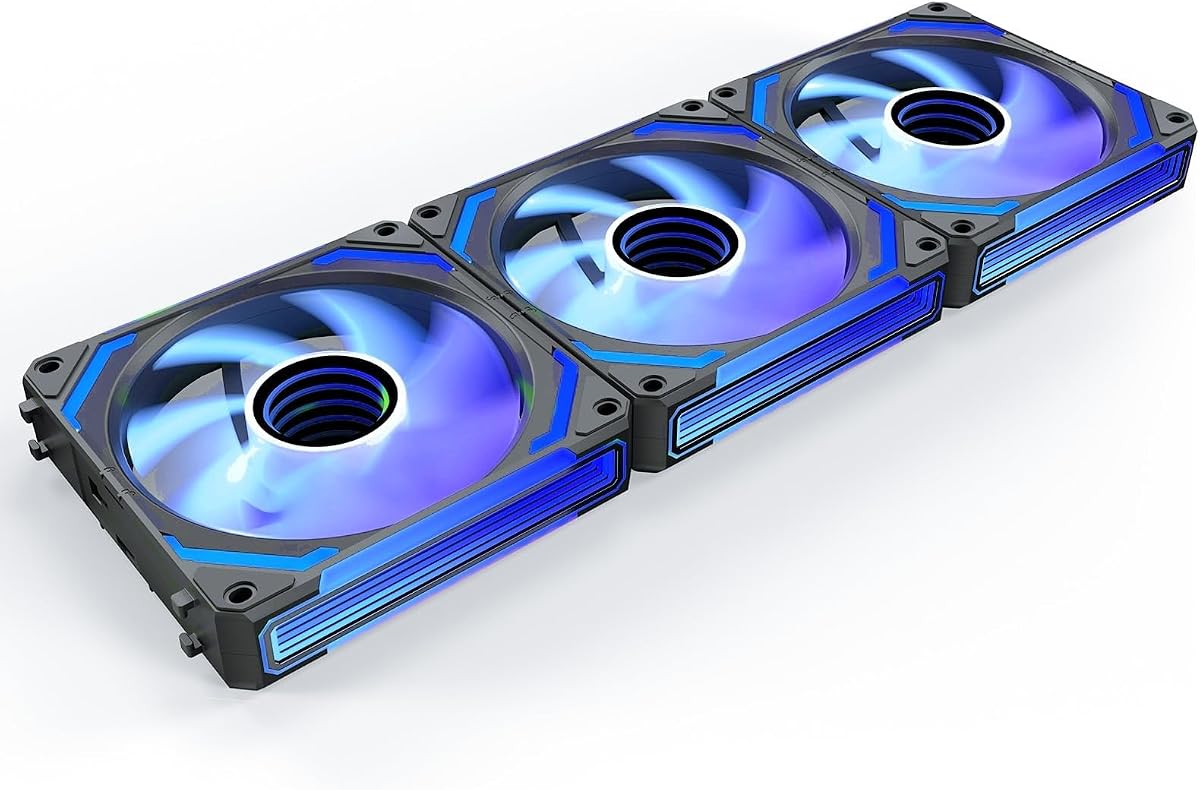
AsiaHorse COSMIQ 120mm 3-Pack
4.8Editor score
Infinity mirror lighting
Music-responsive light modes
Up to 2000 RPM
Up to 68.5 CFM
Interlocking daisy-chain wiring
This Addressable RGB Fans guide compares ten 120mm PWM options for airflow, noise, lighting, bearing quality, wiring, and radiator support.
Addressable RGB fans add individually controlled lighting to a PC while helping move air through the case, cool CPU heatsinks, or support liquid-cooling radiators. A worthwhile option balances airflow, static pressure, acoustic comfort, bearing construction, PWM response, and a clean way to manage cables and lighting.
The products in this guide are compared using their stated specifications, including fan dimensions, maximum speed, airflow, static pressure, noise information, bearing type, lighting connection, and installation features. The list covers single-fan-oriented models, multipacks, daisy-chain systems, forward-and-reverse combinations, and premium mirrored designs.
Each review explains the strongest reason to consider a particular fan while also identifying compromises that buyers should understand. Ratings and product details reflect the supplied listings, while availability and pricing can change, so confirm the current listing and full compatibility details before building or upgrading a system.
4.8Editor score

4.7Editor score

4.7Editor score
This side-by-side comparison highlights the key differences among the ten Addressable RGB fans, including their pack sizes, maximum speeds, airflow performance, acoustic specifications, bearing designs, lighting features, and intended cooling roles.




The Thermalright TL-C12C-S 5-Pack combines a full 120mm fan set with ARGB lighting, PWM control, and a listed maximum speed of 1550 RPM. Its 4.7 rating reflects a broadly favorable balance of cooling specifications, quiet operation, and build flexibility, making it the strongest all-around recommendation in this guide.
We may earn a commission when you buy through this link, at no additional cost to you.
The stated airflow reaches 66.17 CFM with 1.53 mm-H2O of static pressure, giving the fans enough capability for case intake, case exhaust, CPU coolers, and supported radiators. A 4-pin PWM connection allows compatible motherboards to vary the speed according to temperature, while up to 55 cm of cable supports practical series arrangements. The S-FDB bearing is intended to reduce blade vibration and mechanical noise.
Its most attractive feature is the balance between useful cooling data and restrained lighting. The ARGB effect uses high-brightness LEDs integrated into the blades, with up to 17 modes and motherboard color control. That makes the fans suitable for builders who want coordinated illumination without prioritizing a mirror-like or music-reactive visual treatment. The trade-off is a lower top speed than the CORSAIR, ARCTIC, and AsiaHorse options, but 1550 RPM can still provide meaningful case airflow in a compatible layout.
This is a strong choice for a new build that needs several matching case fans, or for an existing system where a group of visually consistent fans improves the interior. It is also appealing for anyone who values a listed noise level of 25.6 dBA and automatic PWM behavior. Buyers should confirm that the motherboard offers a compatible 5V ARGB header or plan to use an appropriate controller.
The TL-C12C-S combines 66.17 CFM airflow with soft ARGB illumination distributed across the blades. That balance suits builders who want the lighting to complement a case rather than dominate the entire interior.
Its 4-pin PWM interface supports automatic motherboard speed control and series use with the supplied cable length. This makes the five-pack practical for coordinated intake and exhaust arrangements.
We may earn a commission when you buy through this link, at no additional cost to you.
The CORSAIR RS120 ARGB triple pack is built for builders who want substantial airflow and static pressure from 120mm fans. It carries a 4.6 rating, reaches up to 2,100 RPM, and is listed at up to 72.8 CFM, making its cooling figures among the strongest in this comparison.
We may earn a commission when you buy through this link, at no additional cost to you.
Static pressure of 2.8 mm-H2O is especially relevant for radiators, heatsinks, and restrictive mounting positions where a fan must push air through obstructions. AirGuide anti-vortex vanes are intended to focus and direct the airflow toward components, while the magnetic dome bearing provides the bearing mechanism. The daisy-chain system allows several fans to use one 4-pin PWM connector and one +5V ARGB connector.
Each fan has eight LEDs with customizable lighting through a compatible motherboard's ARGB control. That is a more restrained lighting layout than some mirrored or high-density designs, but it can produce a coordinated appearance with less visual clutter. The main caveat is dependency on compatible ARGB control for full customization; buyers should not assume that a basic PWM header handles the lighting connection.
This set is well suited to performance-oriented air-cooled systems, radiator-equipped cases, and builders who want strong 120mm airflow without moving to 140mm dimensions. Its high maximum speed may be audible under aggressive load, so a tuned PWM curve is advisable. For those prioritizing maximum listed pressure and airflow in a compact fan format, the RS120 stands out.
The listed 2.8 mm-H2O static pressure is the key attraction for radiators and obstructed airflow paths. This makes the RS120 more performance-oriented than standard case-airflow fans.
One PWM connector and one ARGB connector can serve multiple fans in the daisy chain. That reduces header competition and makes a coordinated multi-fan installation easier to manage.
We may earn a commission when you buy through this link, at no additional cost to you.
The ARCTIC P12 Pro A-RGB is the simplest way to add one high-performance addressable fan to a build. It has a 4.7 rating and a listed maximum of 3,000 RPM, giving it the highest speed ceiling among the products covered here.
We may earn a commission when you buy through this link, at no additional cost to you.
The fan emphasizes high static-pressure performance in dense radiators, narrow perforated panels, and mesh structures. PWM control spans a wide range, and the fan can stop completely below 5% PWM, allowing very low-idle output when the system is cool. Its redesigned blades are intended to balance performance with low noise, especially at reduced speeds.
Precision manufacturing, minimal gaps, automatic balancing, and a self-lubricating FDB bearing all support stable operation. These details make the P12 Pro appealing for users who want one flexible fan rather than a large coordinated set. The obvious limitation is that only one fan is included, so a complete case upgrade still requires additional units and compatible connections.
The P12 Pro A-RGB is a strong recommendation for a focused upgrade, a compact build with limited space, or a radiator position where pressure and precise PWM control matter. It is also a practical entry point for builders who want to try ARGB before purchasing a multipack. A quiet motherboard fan curve is essential when using its broad speed range.
Automatic balancing and minimized rotor gaps help reduce vibration. These construction details complement the redesigned blades, particularly when the fan operates below its maximum speed.
The ability to reduce output to a stop below 5% PWM provides fine control during idle periods. It also gives builders more opportunity to find a quiet operating point than a simpler fan curve.
We may earn a commission when you buy through this link, at no additional cost to you.
The Thermaltake CT120 EX ARGB triple pack emphasizes straightforward installation and synchronized lighting. Its 4.6 rating reflects a favorable balance of magnetic connectivity, addressable RGB, and a hardware-based connection system.
We may earn a commission when you buy through this link, at no additional cost to you.
MagForce 2.0 is the defining feature. Multiple fans can be linked magnetically, allowing the group to connect with only one cable. Each fan carries nine addressable LEDs controlled through compatible 5V motherboard synchronization software, so the set can join a broader lighting ecosystem without running a separate lead from every position.
The fans use an optimized hydraulic bearing and an embedded anti-vibration mounting system. They are positioned for both case and radiator use, although the supplied listing does not provide the same numerical airflow and pressure details presented for several competitors. Buyers who prioritize easy cable management may find that more useful than a short specification list.
The CT120 EX ARGB is a good fit for a clean new build with multiple fan positions and a motherboard that supports 5V addressable lighting. It is less compelling for a one-fan upgrade because the multipack format may be unnecessary. The main requirement is compatible control hardware, either on the motherboard or through an appropriate lighting controller.
MagForce 2.0 connections allow several fans to be grouped without giving every fan a separate motherboard lead. The magnetic design also makes positioning and removal more convenient.
Nine addressable LEDs on each fan support 5V motherboard synchronization. That creates a consistent group effect when the lighting software and physical headers are compatible.
We may earn a commission when you buy through this link, at no additional cost to you.
This six-pack is built around a more complete airflow arrangement than most multipacks. It combines four forward fans with two reverse fans, giving builders a ready-made mix for bottom or side intake and rear or top exhaust. Its 4.4 rating is the lowest in the guide, but the package configuration distinguishes it clearly.
We may earn a commission when you buy through this link, at no additional cost to you.
The reverse-blade fans preserve the visibility of the lighting when installed as bottom or side intake. This addresses a common cosmetic issue in builds where ordinary intake fans point their illuminated face away from the viewer. Every fan includes 28 high-brightness ARGB LEDs and supports motherboard synchronization, while the included controller combines ARGB and PWM control.
Each fan uses nine high-pressure blades, an HDB bearing, and a maximum speed of 1550 RPM. PWM control can respond to CPU or motherboard temperature feedback, reducing unnecessary noise when the system is lightly loaded. Standard 120mm dimensions support case positions, air coolers, and 120, 240, or 360mm liquid-cooling radiators, subject to the radiator and case mounting requirements.
This kit is most appealing to builders creating a comprehensive intake-and-exhaust layout with a visual emphasis. It may be more than necessary for a simple upgrade, and six powered fans require careful cable routing and adequate power headers. Still, for a complete showcase build, the included reverse fans and combined controller offer a convenient package.
Four forward and two reverse fans make it easier to establish an intake-exhaust cycle. The reverse options are especially useful in lower intake positions where the visible face benefits from outward-facing illumination.
The included two-in-one ARGB and PWM hub manages case fans and other ARGB devices from one point. This reduces the number of loose connections in larger six-fan installations.
We may earn a commission when you buy through this link, at no additional cost to you.
The Thermalright TL-C12C-S X3 offers the same core fan platform as the five-fan option in a more moderate three-fan set. Its 4.6 rating, 66.17 CFM airflow figure, 1.53 mm-H2O static pressure, and 1550 RPM maximum speed make it a capable general-purpose choice.
We may earn a commission when you buy through this link, at no additional cost to you.
Four-pin PWM control allows automatic speed changes based on motherboard temperature readings. The S-FDB bearing is designed to minimize blade shaking and noise, while the stated noise level is no more than 25.6 dBA. ARGB lighting can use up to 17 modes and be color-managed or synchronized through a compatible motherboard port.
The three-fan count suits common layouts such as a rear exhaust paired with two front or top positions. The fans can also serve as CPU cooler additions or radiator support where their 120mm size and performance are appropriate. Compared with a five-fan package, however, the only functional distinction is quantity, so buyers should focus on how many positions they actually need.
This pack is a sensible choice for an existing system needing a small, matching replacement group. It provides a quieter-looking specification and useful lighting without reaching the 3,000 RPM ceiling of some alternatives. As with other ARGB products, buyers should verify the case, motherboard headers, and controller requirements before installation.
The listed maximum noise of 25.6 dBA and the S-FDB bearing design indicate an emphasis on low mechanical noise. This is useful for systems that spend substantial time at moderate loads.
Up to 17 ARGB modes provide more variety than a simple fixed-color fan. Compatible motherboard control can also coordinate the group with other illuminated components.
We may earn a commission when you buy through this link, at no additional cost to you.
The Thermalright TL-C12C-S X5 is a five-fan package built around the established TL-C12C-S platform. It earns a 4.7 rating and combines a 1550 RPM maximum speed, 66.17 CFM airflow, and 1.53 mm-H2O static pressure with ARGB lighting.
We may earn a commission when you buy through this link, at no additional cost to you.
Its smart PWM temperature-control function adjusts the fan speed after connection to a compatible motherboard. The listing also notes that a fixed-speed DC mode is available for users who prefer a constant output rather than automatic adjustment. This flexibility is useful when a builder is balancing acoustic comfort against immediate response during gaming or rendering.
The lighting uses high-brightness ARGB elements with up to 17 effects, and the supplied specification identifies a 5V 3-pin lighting interface. The S-FDB bearing is intended to keep operation smooth and quiet. With five identical fans, the set is particularly practical for airflow-intensive layouts that need matching intake and exhaust components.
The TL-C12C-S X5 is a solid choice for a coordinated case refresh or a new system with several mounting locations. It provides more fans than the three-pack without reaching the physical bulk of a six-fan installation. The lack of reverse fans means intake-facing illumination may be less visible, but its cooling and control specifications remain versatile.
The PWM temperature function provides a hands-off starting point for everyday use. A DC option allows fixed operation when consistency matters more than automatic adjustment.
The same 120mm fan can move case air, support a CPU cooler, or sit on a compatible radiator. Matching five units also simplifies the visual consistency of a larger build.
We may earn a commission when you buy through this link, at no additional cost to you.
The Thermaltake CT120 ARGB two-pack is a compact way to upgrade two fan positions without moving to a three- or five-fan set. It carries a 4.6 rating and includes a revised seven-blade design, PWM control up to 2,000 RPM, and nine addressable LEDs per fan.
We may earn a commission when you buy through this link, at no additional cost to you.
A daisy-chain layout reduces the number of cables and motherboard ports required compared with fully separate fan connections. The ARGB side uses 5V motherboard synchronization, and the fans are designed for case or radiator placements. Their hydraulic bearings and solid anti-vibration frame are intended to support reliable, stable operation.
The two-fan configuration is especially useful for a compact case, a paired front intake, or a replacement of two stock CPU cooler fans. It offers enough lighting and speed to make a visual and functional upgrade without creating the wiring demands of a larger group. The listing does not provide detailed airflow or pressure figures, so the CT120 is more attractive on installation and lighting features than on a clear numerical comparison.
This pack suits buyers who know exactly how many fans they need and want 5V synchronization with fewer cables. It is less suitable for a comprehensive six-position airflow overhaul, where a larger pack would be more efficient to install.
The daisy-chain design reduces the number of separate cables and ports needed for the pair. That makes this package convenient in cases with limited header space.
The listed top speed of 2,000 RPM provides a broad operating range for both case cooling and radiator support. A tuned fan curve can keep the pair quieter when system temperatures are low.
We may earn a commission when you buy through this link, at no additional cost to you.
The Thermaltake LE120 ARGB triple pack has the highest listed rating in this guide at 4.8. Its combination of 66.1 CFM airflow, 1.41 mm-H2O static pressure, and a 500 to 1,500 RPM control range gives it a balanced profile for standard 120mm installations.
We may earn a commission when you buy through this link, at no additional cost to you.
Nine ARGB LEDs per fan use a 3-pin 5V connector, and the daisy-chain ARGB cables simplify group wiring. The package includes a three-way PWM splitter for installation convenience. Nine blades per fan contribute to the stated airflow figure, while the hydraulic bearing is intended to provide steady operation over the fan's life.
Compared with the more aggressive CORSAIR and ARCTIC options, the LE120 has a lower maximum RPM and static pressure. In return, it is designed around a controlled 500 to 1,500 RPM range, which may make it easier to tune for a quieter working environment. The 66.1 CFM airflow remains competitive for case ventilation and ordinary CPU cooling positions.
This triple pack is a compelling choice for builders who want matched fans, tidy synchronization, and easy installation. It is particularly useful when the system does not need extreme pressure through a dense radiator. Buyers should still verify radiator dimensions and the physical orientation of their case because the stated pressure is lower than the strongest alternatives here.
The 500 to 1,500 RPM range provides a useful operating window for everyday use. It avoids the extreme upper speeds of some high-performance models while retaining substantial airflow.
A three-way PWM splitter and daisy-chain ARGB cables reduce setup complexity. The package is therefore convenient for a fresh three-position installation.
We may earn a commission when you buy through this link, at no additional cost to you.
The AsiaHorse COSMIQ 120mm triple pack is the most visually elaborate option in this guide. It carries a 4.8 rating and uses an infinity mirror design with layered RGB illumination, music-responsive modes, and support for 5V 3-pin motherboard synchronization.
We may earn a commission when you buy through this link, at no additional cost to you.
The cooling specifications are also substantial. Its PWM range extends from 800 to 2,000 RPM, with up to 68.5 CFM airflow and 2.05 mm-H2O static pressure. A hydrodynamic FDB bearing supports smooth operation, while the listing reports maximum noise of 29.2 dBA at full speed. These figures make it suitable for ATX and MATX cases, desktop upgrades, and AIO radiator installations.
An interlocking daisy-chain design is intended to reduce redundant wiring and keep the case interior orderly. A small dedicated controller provides independent lighting control, and the built-in sound pickup can select among eight music-rhythm lighting modes. That feature is the model's defining attraction, although it is less relevant to buyers who prefer a static synchronized effect.
The COSMIQ is best for showcase builds where the infinity mirror appearance, lighting reactions, and coordinated wiring justify prioritizing visual design. Its 2,000 RPM maximum is not the highest here, and the stated full-speed noise is higher than the quietest listed alternative, but the combination of 2.05 mm-H2O pressure and 68.5 CFM airflow remains strong. Check controller placement and header availability before ordering.
The infinity mirror construction creates a layered visual effect that differs from conventional diffuser-style fans. It is especially noticeable in a glass-sided case with restrained internal lighting.
A built-in sound pickup supports eight music-rhythm modes, while the controller also allows independent control. This adds interaction beyond standard motherboard synchronization.
Up to 68.5 CFM airflow and 2.05 mm-H2O static pressure support strong performance in cases and radiators. The 800 to 2,000 RPM range also allows meaningful control over noise.
We may earn a commission when you buy through this link, at no additional cost to you.
The right Addressable RGB fan depends on case layout, cooling pressure, lighting ecosystem, wiring capacity, and preferred noise level. Comparing these factors before ordering prevents a visually attractive multipack from becoming awkward to install or unsuitable for a radiator.
Begin by mapping the available intake and exhaust positions. A balanced layout generally benefits from coordinated fans, but the direction of each position matters. Forward fans move air into the case, while reverse fans are commonly used for bottom or side intake so the illuminated face remains visible. The six-pack in this guide includes four forward and two reverse fans, while most other products contain matching forward fans.
Choose a direction mix that supports the case's intended airflow path. Confirm mounting thickness, screw positions, and the space available around radiators, drive cages, cable routing areas, and CPU coolers.
Static pressure indicates how effectively a fan can push air through restrictive components. Fans installed on radiators, dense heatsinks, perforated panels, and mesh filters generally benefit from higher-pressure models. The CORSAIR RS120 leads the listed figures at 2.8 mm-H2O, followed by the AsiaHorse COSMIQ at 2.05 mm-H2O and the Thermalright models at 1.53 mm-H2O.
For an open case with unrestricted airflow, the difference may be less important. For a radiator or restrictive filter, prioritize pressure over cosmetic extras and ensure the fan's stated use includes that position.
Maximum airflow provides a useful indication of a fan's overall air-moving capacity, while top speed affects its ability to ramp up under load. The listed ceiling ranges from 1,500 RPM to 3,000 RPM. ARCTIC reaches the highest speed, CORSAIR and AsiaHorse offer 2,000 to 2,100 RPM, and the Thermalright range tops out at 1,550 RPM.
Higher speed is not automatically better. It can increase noise and power use, so use the maximum figure alongside airflow, bearing quality, and the ability to tune PWM curves.
Acoustic specifications are not perfectly comparable across brands, but the supplied figures still offer context. The Thermalright TL-C12C-S models list a maximum of 25.6 dBA, while the AsiaHorse COSMIQ lists 29.2 dBA at its 2,000 RPM maximum. Other products emphasize low-noise construction, balanced blades, anti-vibration mounting, or smooth bearings without providing an equivalent numerical figure.
Look for a broad PWM range and quiet bearing design, then plan a fan curve that keeps the system near idle speed. Placement and radiator resistance also influence the final sound level.
Addressable RGB lighting requires both a compatible controller and the correct physical connector. Most products in this guide use a 5V 3-pin ARGB connection, which should not be confused with 12V 4-pin RGB. A compatible motherboard header is the simplest route, while a separate controller may be needed for additional devices or specialized lighting effects.
Confirm the connector before buying, especially when reusing older fans. Also check the software ecosystem and whether the case's existing controller supports the number and type of fans you plan to install.
A multipack is easier to install when the fans can be linked. CORSAIR uses a system controlled through one PWM and one ARGB connector, Thermaltake offers magnetic or daisy-chain arrangements, AsiaHorse uses an interlocking design, and the six-pack includes a combined ARGB and PWM hub. These features can reduce header pressure and visual cable clutter.
Plan the cable route before installation and leave enough slack for removal. A tidy-looking box can still produce a crowded case if the lighting and power leads cross awkwardly or force long peripheral cables.
Bearing design affects long-term smoothness, vibration, and acoustic consistency. The choices here include S-FDB, FDB, magnetic dome, hydraulic, and HDB constructions. Several products emphasize minimal gaps, automatic balancing, or anti-vibration mounting to keep rotor movement controlled.
For a finished build, match the bearing quality to the importance of quiet operation. Regardless of design, proper mounting pressure and balanced cable placement can influence how smoothly a fan runs.
A single-fan package is appropriate for a replacement or focused radiator upgrade, while two-, three-, five-, and six-packs suit increasingly complete layouts. Consider whether future expansion might require another matching unit and whether the manufacturer sells that model separately in a compatible color and connector configuration.
Avoid buying a large set simply because the number of positions appears convenient. Measure the case and count usable mounting locations first, then choose the smallest group that fully covers the intended airflow design.
Plan the airflow before mounting each fan. Identify intake and exhaust positions, confirm that every 120mm opening has the required screw pattern, and check whether any side or bottom position needs a reverse-blade fan. Connect the PWM leads to an appropriate motherboard header or splitter, then connect the 5V 3-pin ARGB lighting leads to a compatible header or controller.
Configure the hardware before adjusting the software. Use the motherboard or lighting controller to assign a PWM curve, establish a minimum speed that avoids abrupt starts and stops, and create a lighting profile that matches other addressable devices. If using a music-responsive controller, test the sound pickup at different positions because nearby fans and case materials can affect what it detects.
For maintenance, power down the system before removing any fan. Hold each frame by its corners rather than pressing on the blades, disconnect the PWM and ARGB cables carefully, and remove mounting screws without scraping the case. Keep the intake mesh clean, check that screws are firmly seated but not overtightened, and listen for new vibration or rubbing sounds after any change.
The two connectors serve different lighting systems and are not interchangeable. A 3-pin 5V ARGB connection provides individually addressable lighting and uses five volts, while a 4-pin 12V RGB connection generally provides fixed-color effects in defined groups. Connecting the wrong type can damage a header, fan, or controller, so verify the labeling before installation.
It depends on the CPU cooler design and its mounting hardware. Most of the products listed are standard 120mm fans and may fit some coolers, but proprietary coolers can use different sizes, frames, mounting clips, or connector arrangements. Check the cooler manufacturer's fan specification and make sure the replacement has the same dimensions and appropriate mounting points.
No. Radiator performance depends on airflow, static pressure, frame thickness, noise, and the overall cooling design. A high-speed fan may create more noise without improving results if static pressure is inadequate, while a well-matched lower-speed fan can provide quieter cooling. Match the fan to the radiator size and mounting depth, then tune its PWM curve.
Many ARGB fans display a default lighting effect without software, but advanced color control usually requires a compatible motherboard utility or controller software. Motherboard software is especially useful for synchronizing lighting with other addressable devices, creating gradients, and configuring lighting effects across multiple fans.
They can often operate together because most use a standard 5V 3-pin ARGB connector, but synchronization may not be perfect. Different manufacturers can use different LED layouts, control protocols, software, and default effects. Keeping the same model in one group usually produces the most consistent appearance and simplifies troubleshooting.
Forward fans are the conventional choice for most intake and exhaust positions, while reverse fans are designed for selected intake locations. A reverse fan can move air into the case while keeping the illuminated face visible through a glass or mesh panel. It does not automatically provide better cooling, so direction should be chosen for both airflow and appearance.
The correct number depends on the case, CPU cooler, GPU cooler, and intended airflow route. Three fans can work well in compact or basic configurations, while five or six may suit larger cases with multiple intake and exhaust positions. Count usable mounts and avoid blocking vents or routing cables where they interfere with airflow.
The issue may come from an unsupported ARGB header, an incorrect 5V versus 12V connection, a loose daisy-chain plug, a power or controller limit, or incompatible lighting software. Check the voltage and pin count first, reseat the connectors without forcing them, reduce the number of devices on the controller, and update the relevant software.
The Thermalright TL-C12C-S 5-Pack stands out as the most balanced overall choice, combining a generous multipack, PWM temperature control, ARGB effects, and a quiet listed operating level. The AsiaHorse COSMIQ takes the premium position with infinity mirror lighting, audio-reactive effects, and strong cooling figures, while the ARCTIC P12 Pro A-RGB offers a focused, budget-conscious entry into high-speed 120mm cooling.
For most builders, prioritize airflow direction, static pressure, connector compatibility, and clean cable management before selecting a lighting style. A larger multipack is not automatically better if the case does not need the extra positions. Pay close attention to radiator depth, reverse-blade requirements, PWM curves, and whether the motherboard can control the selected ARGB ecosystem.
Ratings, product configurations, and availability can change over time, and market pricing also fluctuates. Review the current listing before purchasing, verify every connector and mounting dimension, and confirm that the included splitter or controller is sufficient for the complete planned installation.